
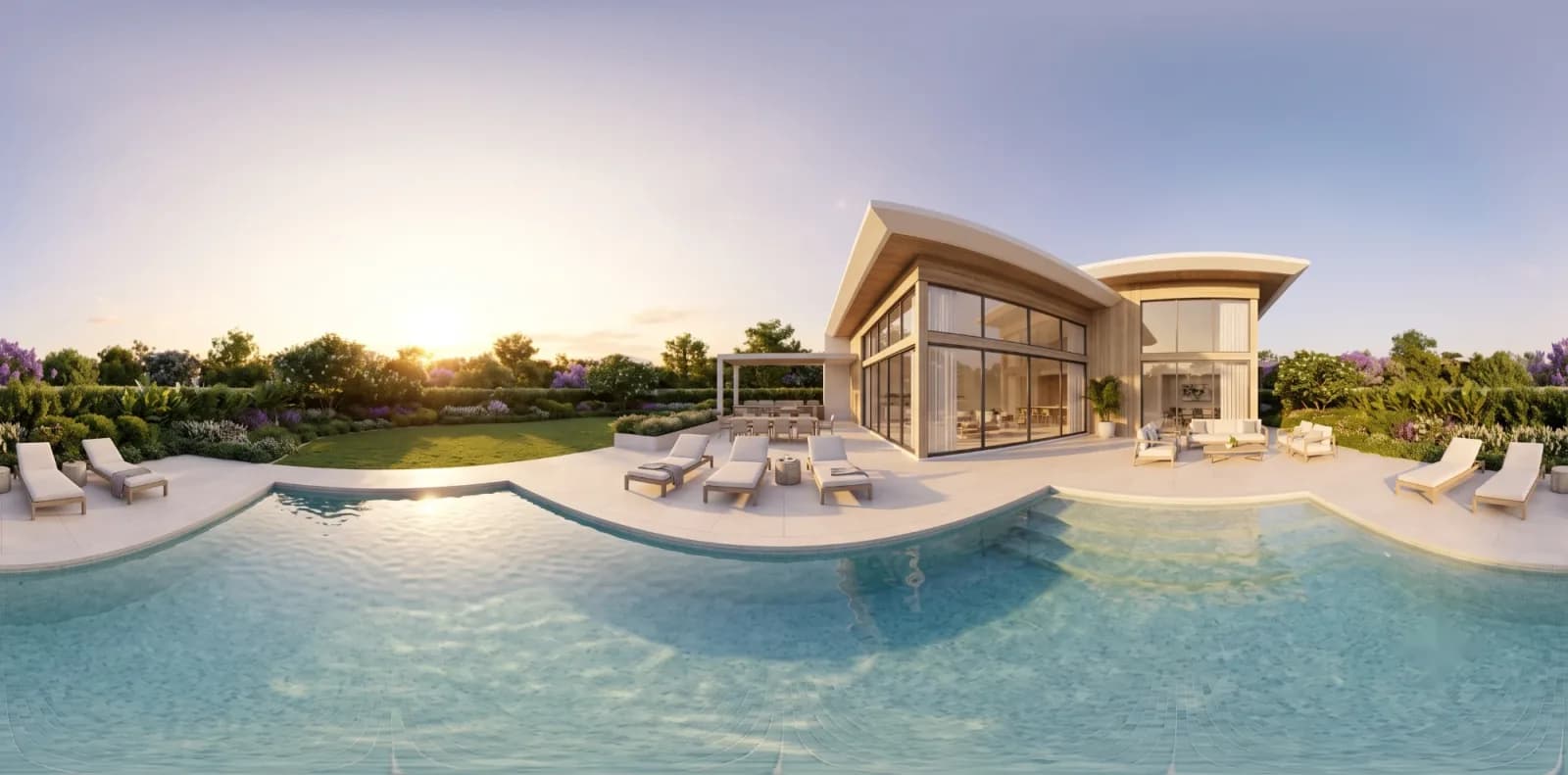
Rendered 360 tours for spaces that are not built yet
360° Rendered Virtual Tours for Unbuilt Projects
360 Space delivers 360 rendering services and 360 virtual tour services for spaces that are not built yet. Rendered 360 tours let buyers explore a sample flat or clubhouse on any phone, built from drawings with no site access needed.
- sample flats online
- remote buyers
- site-office kiosks
02What it is
360 3D rendering produces panoramic images of a 3D model that viewers can look around in.
03What it is, continued
What 360 3D rendering is, and when you need it
We link those panoramas into an interactive virtual tour with hotspots, floor plans and unit details, so buyers move through an unbuilt flat or amenity as if they were standing in it.
This page covers rendered tours, made from drawings. For spaces that already exist (ready flats, hotels, showrooms), we capture them on site with a 360° camera instead: see 360° virtual tour photography.
Tours built from drawings need no finished building: send plans and elevations, and the explorable tour is rendered from them. Buyers explore unbuilt homes in 360° and view on phone, web and VR, and immersive 360° sample flats let them stand in each room.
What buyers can do in a 3D virtual tour
- 01Look around every room in 360 degrees
- 02Jump between rooms from a floor plan
- 03Open hotspots with finishes and unit details
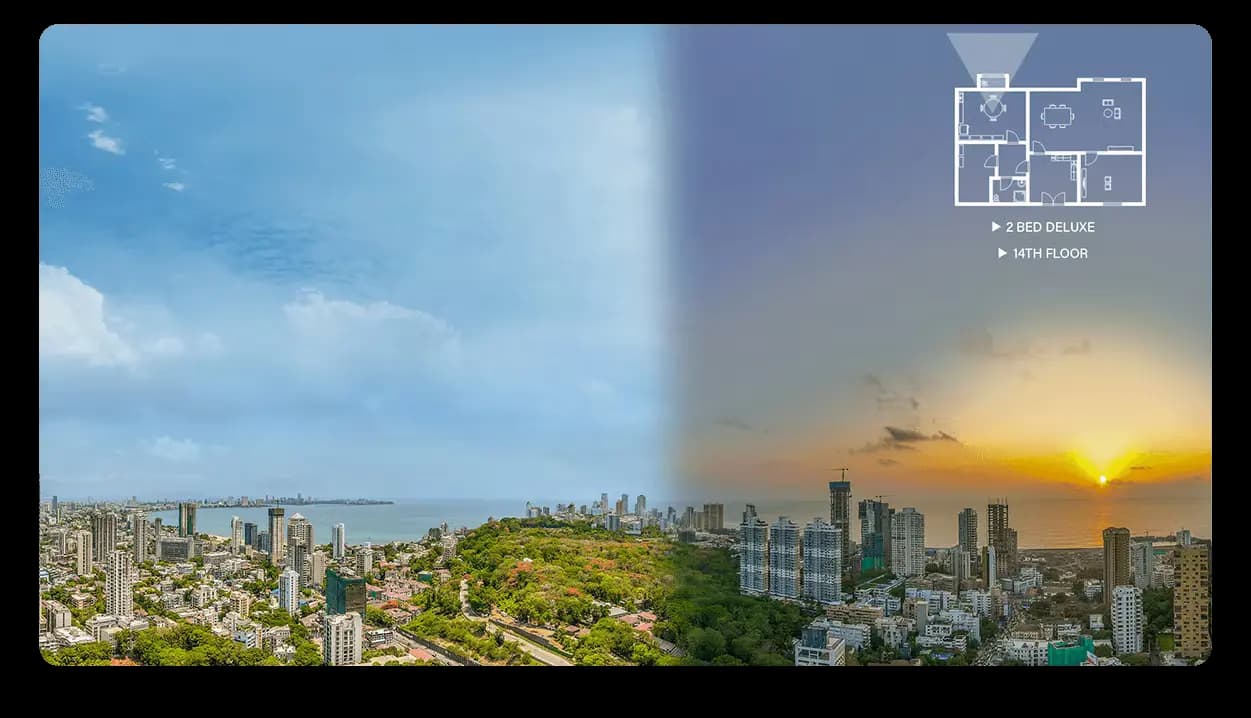
- 04Switch day and night where rendered
- 05View on phone, laptop or VR headset
04Features
Features of a rendered 360 virtual tour
A rendered 360° tour is built from the 3D model, so buyers look around a space that does not exist yet as if they were standing in it. For location, amenities and units in one site, see ImmersiView.
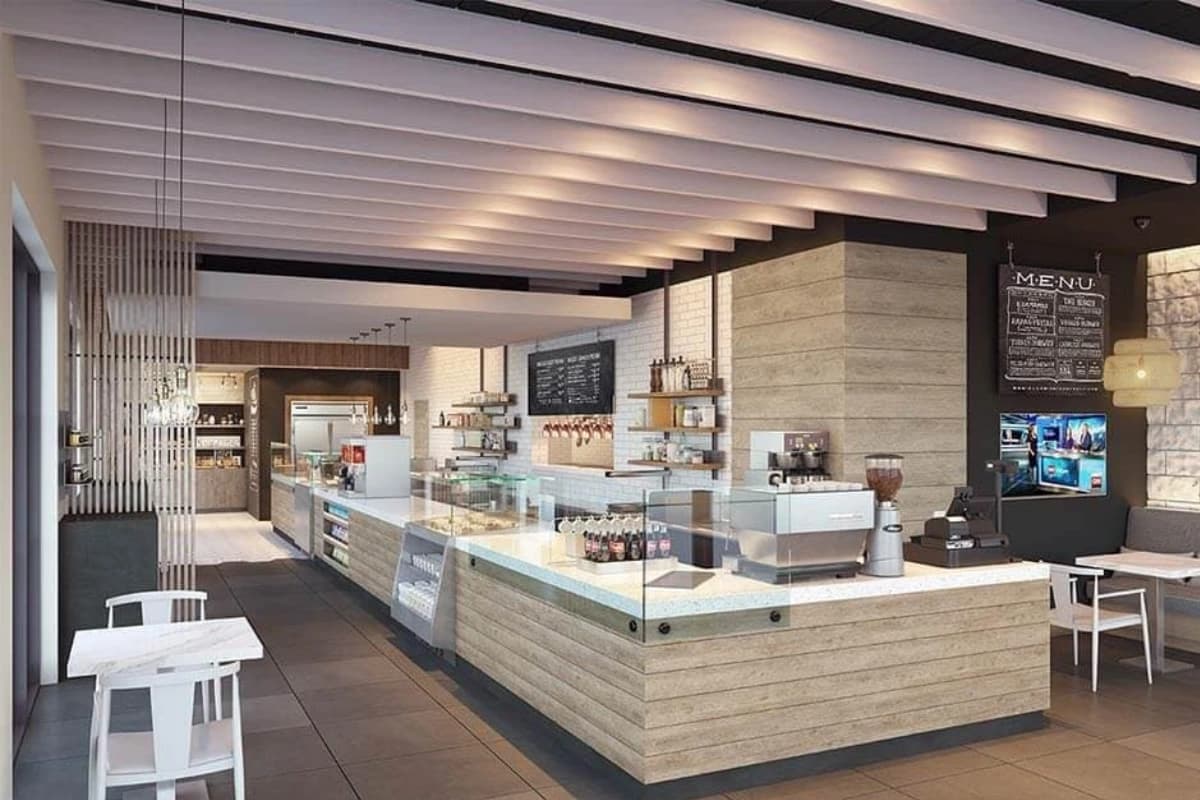
- 01Look around every roomEach camera point is a full 360° view of a furnished room, so buyers turn freely and see the layout, finishes and light as they will be.
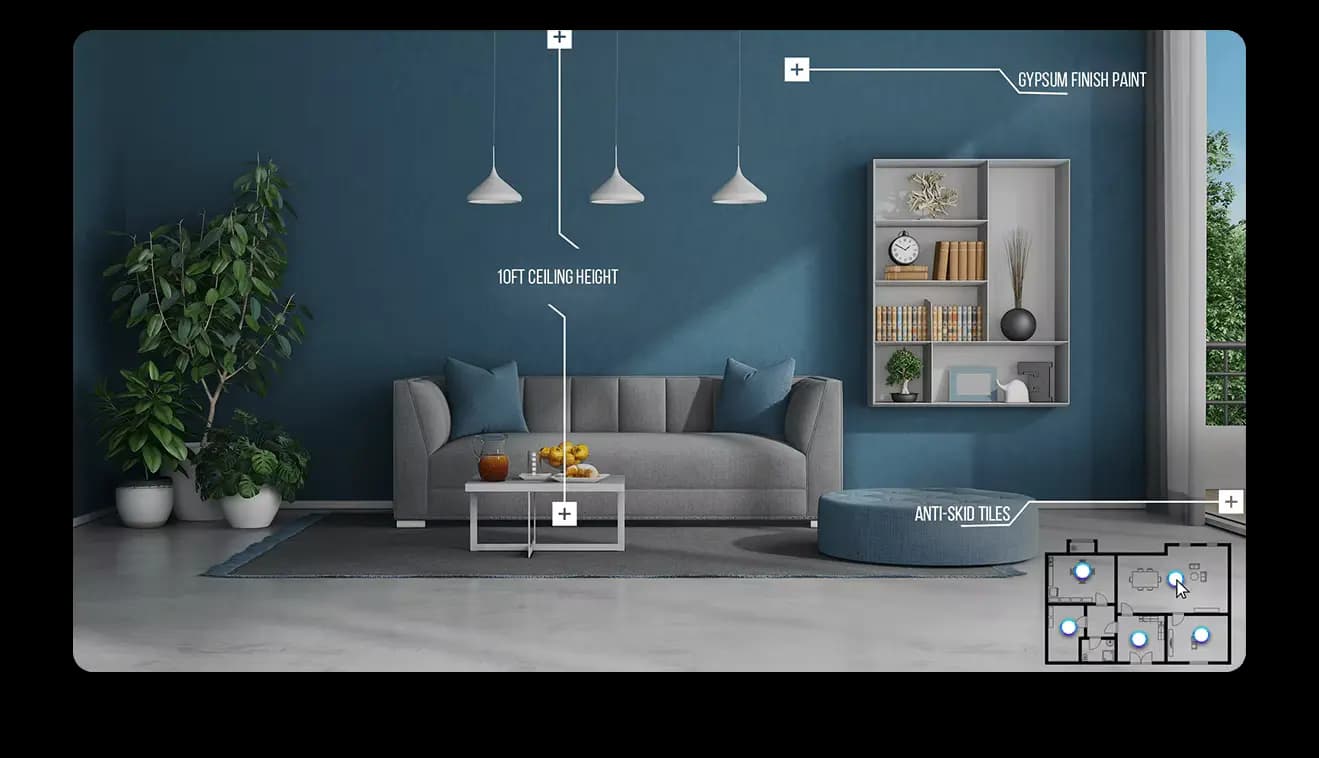
- 02Hotspots on finishes and fixturesLabelled hotspots name the materials and details in view, such as ceiling height, tile and paint, so a buyer can read the specification inside the room.
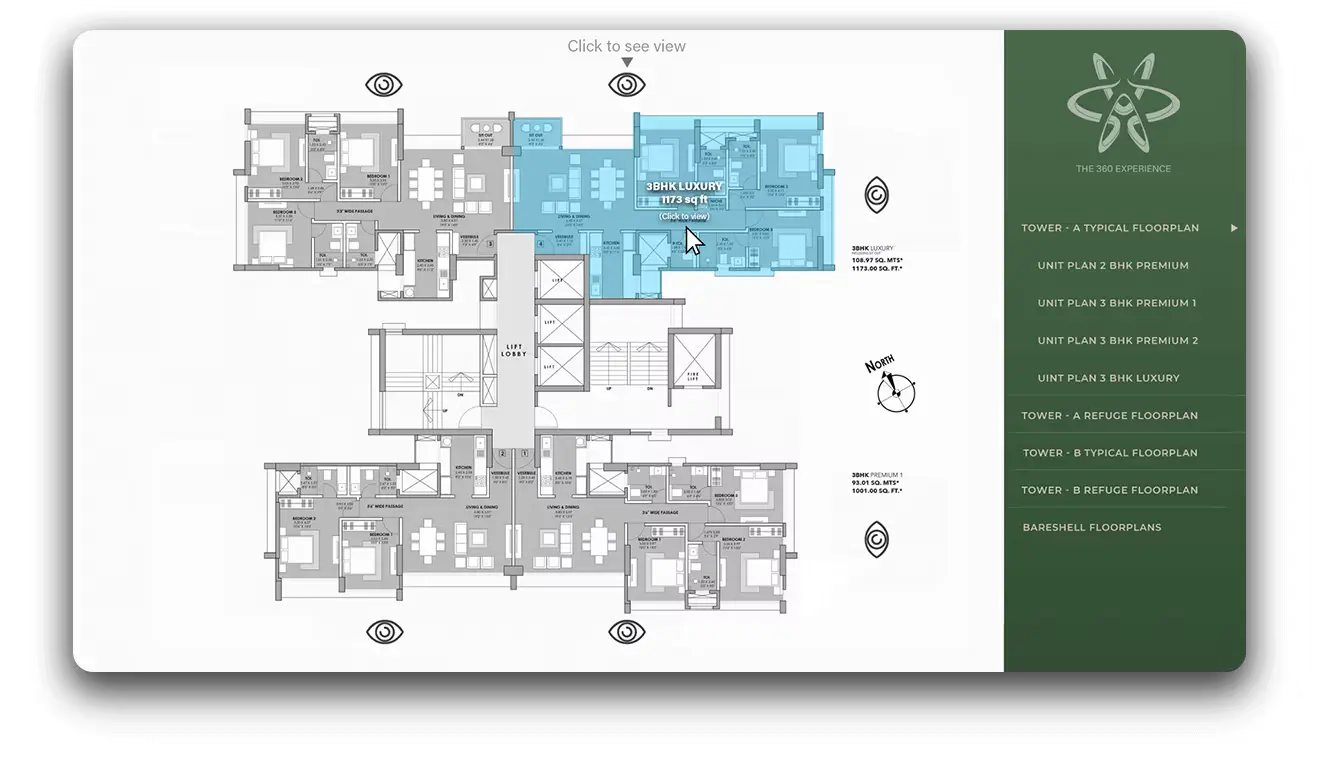
- 03Move through the planA floor plan sits beside the tour. Buyers tap a room on the plan to jump to it and see where they are standing as they move.
- 04Views from the unit, day to nightWindow views are shown from the unit itself, and the same view can switch from day to sunset where the tour is set up for it.
05Benefits
Benefits of 360 virtual tours for users
What a tour does for the people who explore it, and for the team selling the space.
Enhanced engagement
Users explore content interactively, which increases the time they spend and their interest.
Improved visual storytelling
A project is shown from every angle, so the story is richer than a set of stills.
Increased conversion rates
A clear, detailed view builds trust and confidence in potential buyers, which supports sales.
Access anytime, anywhere
Audiences across the world can explore the project at any hour, whatever their time zone.
06Live tours
Interactive 360 tours you can open now
Live tours from our projects, with a plan to move between rooms. Each opens on tap.
07Use cases
Virtual tours for real estate sales
Sample flats online
Buyers see the flat before the physical sample flat is ready, or instead of it.
Remote buyers
NRI and out-of-city buyers explore the unit and amenities from a link.
Site-office kiosks
A screen or VR headset in the sales gallery for guided visits.
Channel partners
Brokers share one link instead of a folder of images.
08In detail
In detail
The rest of what we cover for this work, one topic at a time.
01
Rendered vs photographed 360 tours
Two different services that share a viewer.
| Question | Rendered 360 tour | Photographed 360 tour |
|---|---|---|
| Is the space built? | Not yet, made from drawings | Yes, captured on site |
| Site access needed? | No | Yes, a shoot day on site |
| Inputs | Plans, finishes, furniture references | The ready space, cleaned and lit |
| Can it change later? | Yes, update the model and re-render | Only by reshooting |
| Best for | Pre-launch, sample flats online | Ready homes, hotels, schools, showrooms |
| Service page | This page | 360° photography |
02
How a rendered 360 tour is built from your drawings
A rendered 360° tour is a set of panoramic images made from the 3D model of a space that has not been built. As a 360 rendering studio, we build the model from your drawings, place a camera at each chosen point in the room and render a full spherical image from it. The panoramas are then joined by hotspots so the viewer can move from one position to the next, open a floor plan or read details about a feature.
The camera points are chosen the way a visitor would move through a space: the entrance, the centre of the living room, the kitchen, the balcony. Each point should reveal a new view and the next point should be visible from it, so the tour feels like a walk and not a set of jumps. Fewer, better-chosen points usually make a stronger tour than many near-identical ones.
Because the tour comes from the same model as the stills and the film, the materials, furniture and light match. If a finish changes, the affected panoramas are re-rendered and the tour link stays the same, so the version already shared with brokers and buyers updates itself.
Decisions made when planning a tour
- Which rooms and positions to include
- How points connect: by hotspot, floor plan or both
- Which details to label, such as finishes or room sizes
- Whether to include day and evening lighting
- Where the tour will be embedded or shared
03
What hotspots can do in an interactive 360 tour
Interactive virtual tours are defined by their hotspots.
| Hotspot | What the viewer does | Purpose |
|---|---|---|
| Move | Click an arrow to go to the next position | Walk through the space |
| Room link | Pick a room from a menu or plan | Jump to the room that matters to them |
| Info point | Open a short label or image | Explain a finish, fixture or feature |
| Floor plan pin | See where they are on the plan | Understand layout and orientation |
| Contact point | Open an enquiry action | Turn interest into a lead |
04
Which spaces work best as an immersive virtual tour
Immersive virtual tours suit any space that buyers want to understand from the inside. These are the ones we are asked for most.
- Sample flats: A walkable apartment so remote buyers can judge layout, light and finish before visiting.
- Amenity spaces: Clubhouse, gym, pool deck and lounges shown in one tour for community-led projects.
- Lobbies and common areas: The first impression of a building, shown at real scale with materials and lighting.
- Offices and co-working floors: Floor plates, meeting rooms and breakout spaces for leasing teams.
- Hotels and serviced residences: Rooms, suites and public areas for sales and booking pages.
- Showrooms and stores: Display layouts and fit-out concepts for brand and franchise teams.
05
Using a 360 virtual tour in the sales process
A tour is most valuable when it sits where buyers already are. On a project website it can open from a sample flat button or sit inside a unit page beside the floor plan. On a tablet it supports the sales conversation in the site office. As a link on messaging apps it lets a broker share a unit with a customer in a few seconds.
For overseas and out-of-city buyers, a tour often replaces the first visit. They explore the home on a phone, send the link to family and arrive at the site already knowing which unit they want. For sales teams, that means fewer introductory visits and more serious ones.
A tour should also connect to the rest of the launch: the same links go into the brochure through a short URL or QR code, into ads and into the investor deck. Because all assets are produced together, the tour shows the same finishes the buyer saw in the render that caught their attention.
Where a rendered tour can be placed
- A button on the project website
- A unit page beside the floor plan
- A tablet in the sales gallery
- A broker message with a short link
- A QR code on a brochure or hoarding
06
Viewing a rendered tour: phone, laptop and headset
A rendered tour is built once and viewed on any device.
| Device | How the viewer looks around | Notes |
|---|---|---|
| Phone | Drag with a finger or move the phone | Most buyers open tours on phones from a message or ad |
| Laptop or desktop | Drag with the mouse | Common for research and for brokers presenting |
| Tablet in a sales gallery | Touch and gyroscope | Works well beside a salesperson |
| VR headset | Turn the head to look around | Gives the strongest sense of scale |
07
What to decide before briefing a rendered 360 tour
A few early decisions make a tour more useful and shorten the brief.
- Which units, rooms and amenities to include
- Whether day and evening versions are needed
- Whether the tour needs a floor plan menu
- Finishes and features worth labelling
- Any compliance or disclaimer text to show
- Contact or enquiry actions to include
- Where the tour will be embedded or linked
- Whether a QR code is needed for print
- Who on your team will manage updates later
08
360 virtual rendering, 360 degree rendering and immersive real estate experiences
Buyers describe the same product in several ways: 360 virtual rendering, 360 degree rendering or a 360 rendered tour. We produce all of them from drawings, and deliver high quality 360 rendering as web links that open on phones, laptops and headsets. For sales teams, the tour is one part of a wider immersive real estate experience that can include plans and films.
Agencies can use the studio as a 360 virtual tour agency behind their own client work, with delivery under their name.
09
Sample Flat 360° Virtual Tour
We build sample flat virtual tours: a virtual show flat buyers explore on any phone, rendered from drawings before the physical flat exists.
A virtual sample flat is a 360 show flat built from the unit plan and finish schedule. Buyers move room to room, open hotspots for finishes and jump between rooms from the plan, from wherever they are.
It reuses the show flat render model, so stills and tour match exactly. This section also covers online sample flat.
Inside the immersive sample flat tour
- Every room in 360°
- Floor plan navigation
- Finish hotspots
- Enquiry and WhatsApp buttons
- Optional VR mode
10
360° Panorama Rendering
We deliver 360 panorama rendering: single 360 degree rendering images of a room or view, for listings, social posts and VR, without building a full tour.
A 360 image rendering is one equirectangular render: a single point the viewer can look around from. A full tour links many panoramas with navigation and hotspots.
Panoramas are a lighter option when one or two key spaces are enough, such as a living room or a rooftop view. This section also covers panoramic render.
Where single panoramas fit
- Listings with a 360 viewer
- Social posts that support 360
- VR headset demos
- One hero space before a full tour
11
360 degree walkthrough services in Mumbai and across India
A 360 degree walkthrough is a rendered tour in which the viewer moves between rooms and looks in any direction. We provide 360 degree walkthrough services in Mumbai and across India, built from your drawings before the project is finished, and opening on a phone or browser with no app.
Where a film is needed instead of an interactive tour, see 3D walkthrough services in Mumbai.
09FAQ
Questions about rendered 360° tours
Do you need site access for a rendered 360 tour?
No. We build rendered 360 tours from drawings, finishes and furniture references, so no site access is needed. That is why rendered tours work before construction starts. More in virtual tours before construction.
What is the difference between rendered and photographed 360 tours?
A rendered 360 tour from 360 Space is made from drawings for spaces not built yet and can be updated when the design changes. A photographed tour is captured on site with a 360° camera for spaces that already exist. See 360° photography.
Can buyers view the tour on phones and VR headsets?
Yes. Our tours open in a web browser on phones, tablets and laptops with no app, and support VR headset viewing. The headset for a site office or demo is agreed at the brief.
Can you add hotspots, floor plans and unit details?
Yes. We add hotspots with finish and unit information, a floor plan for moving between rooms, and link to enquiry forms or WhatsApp inside the interactive 360 tour.
Can the tour be updated if the design changes?
Yes. Because the tour is rendered from the 3D model, we update the model and re-render the affected rooms when finishes or layouts change, without a reshoot.
How many camera points should a rendered 360 tour have?
360 Space plans the number of camera points from the space and the use. A small apartment usually needs a handful of well-chosen positions, while amenity tours need more. The aim is a tour that feels like a walk, so each point reveals something new and connects clearly to the next.
Can a rendered 360 tour be embedded on our website?
Yes. We deliver rendered 360° tours as web links and embed code that work on project websites, unit pages and landing pages. They open on phones, laptops and VR headsets, and can also be shown on a tablet in a sales gallery with a QR code on print material.
Will the tour show the same finishes as the renders?
Yes. We build stills, film and tours from one 3D model, so materials, furniture and lighting match across every asset. When a finish changes, the affected panoramas are re-rendered and the tour link stays the same, so shared links update.
Do rendered 360 tours help remote and overseas buyers?
360 Space builds rendered 360° tours so buyers who cannot visit the site can explore a sample flat or amenity on their phone. Many use the tour as their first visit, share the link with family and arrive at the site already knowing which unit they want.
What should I compare when searching for the best virtual tour company India has?
Compare whether tours are built from your drawings or photographs, how many points and hotspots are included, how fast tours open on a phone and whether finishes match your renders. 360 Space builds rendered tours from one model, so stills, films and tours agree.
Can a virtual sample flat replace a physical one?
For many buyers, yes, especially before the site is ready and for out-of-city buyers. A virtual sample flat from 360 Space is available earlier and anywhere; some developers still build a physical flat later.
Can buyers switch finish options inside the tour?
Finish switching inside a 360 Space tour works by rendering each option as its own set of panoramas and linking them, so options must be planned in the brief.
What is a 360 panorama render?
A 360 panorama render from 360 Space is a single equirectangular image of a room or view that viewers can look around in, made from the 3D model.
How is a panorama different from a full virtual tour?
A panorama is one viewpoint. A full tour from 360 Space links many panoramas with floor plan navigation and hotspots. See 360° rendered tours.
Do you provide 360 degree walkthrough services in Mumbai?
360 Space provides 360 degree walkthrough services in Mumbai and across India. The tour is rendered from your drawings, so it can be shared before the building is finished, and it opens on a phone or browser.
Start a project
Share your drawings, get a scope and quote
360 Space replies with a scope, camera list and timeline. Send CAD, BIM, SketchUp or PDF drawings on WhatsApp or email.