
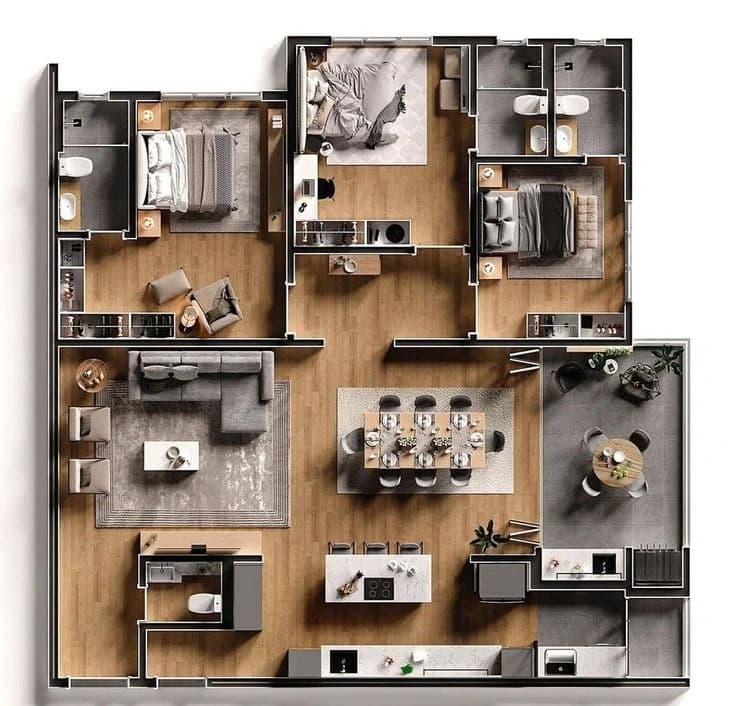
Floor plan rendering, India
3D Floor Plan Rendering Services
360 Space delivers 3D floor plan rendering services that turn 2D layouts into furnished 3D floor plans buyers understand at a glance. As a 3D floor plan company India developers can brief from any city and an India based floor plan rendering company, we produce top-down, isometric and interactive floor plans for brochures, listings and unit selection.
- brochures
- unit selection
- listings
02What it is
Why 3D floor plans sell units faster
A 2D plan shows walls and dimensions. A 3D floor plan from us shows the same layout furnished, with floor finishes, light and scale, so a buyer can picture where the bed, sofa and dining table go. Floor plan visualization is often the most used image in a brochure, because every buyer compares unit types.
We also render site plans and amenity plans, and turn unit plans into interactive floor plans that open 360° views of each room. See animated and interactive floor plans.
2D to 3D plan conversion turns a flat CAD or PDF plan into a furnished 3D view, and isometric and dollhouse views show the whole layout at once.
- 01Top-down furnished plans
- 02Isometric and dollhouse cutaways
- 03Site plan rendering with landscape
- 04Interactive floor plans linked to 360 views
03Gallery
3D floor plans from recent projects
04Our projects
Floor plan projects
Floor plans we have produced for developers. Each card opens the full project.


05How plans are built
A 3D floor plan is a view of a unit from above, with walls cut at a low height so every room is visible and furniture, flooring and fixtures are shown at scale.
06Choices
Design choices that make a floor plan easier to read
High-quality 3D floor plans are mostly a matter of restraint. These are the choices we make to keep a plan clear.
Consistent furniture style
The same furniture family across all units keeps comparisons fair and stops the plan from looking like a catalogue.
Limited colour palette
A restrained flooring and wall palette lets the layout stand out and keeps printing predictable.
Readable labels
Room names sit at a size that survives reduction to a phone screen or a small brochure panel.
Light and shadow, kept soft
Soft shading gives depth without hiding corners or small rooms.
Dimensions where they help
Room sizes are shown when buyers ask for them, with a clear note on whether they are carpet or built-up.
Orientation cue
A north arrow and the main entrance are marked so buyers understand light and approach.
07In detail
In detail
The rest of what we cover for this work, one topic at a time.
01
How unit-type batches are scoped
Large projects repeat unit types.
| What changes the scope | Why |
|---|---|
| Number of unique unit types | Each unique layout is modelled and furnished once |
| Mirrored units | Usually reused from the original plan |
| Furniture style variants | Each style is a separate furnishing pass |
| Plan style | Top-down, isometric or interactive differ in effort |
02
How a 2D layout becomes a furnished 3D floor plan
We start from your 2D plan, trace the walls, doors and windows into a 3D model and then furnish each room to suit its use. The result explains a layout to a buyer in a few seconds, which a line drawing rarely does.
Dimensions come from the drawing, so rooms keep their real proportions. Furniture is chosen at believable sizes: a double bed, a four-seat dining table, a sofa that fits the wall it sits against. Where a room has a particular use, such as a study corner or a pooja unit, the plan shows it so a buyer can see their own routine in the space.
Because 3D floor plans are built from the same model as renders and tours where those are commissioned, the layout, finishes and furniture match across assets. A buyer who sees a living room in a plan, then in a render, then in a tour is looking at the same room, which builds trust in the whole presentation.
What a furnished 3D floor plan can show
- Walls, doors, windows and balcony at real proportions
- Furniture in believable sizes for every room
- Flooring and wall colours that reflect the specification
- Room names and optional dimensions
- North direction, unit number and a simple legend
03
Which type of 3D floor plan suits which use
Floor plan visualization comes in several styles, each with its own strengths.
| Style | What it shows | Best for | Limit |
|---|---|---|---|
| Furnished top view | Flat top-down view, furniture at scale | Brochures, unit sheets, broker handouts | Less depth than an angled view |
| Isometric or dollhouse | Cut-away angled view of the whole unit | Websites, social posts, presentations | Ceiling height is not obvious |
| Site plan rendering | The whole development with towers, roads and landscape | Masterplan pages, investor decks | Individual units are small |
| Interactive floor plan | Clickable plan linked to rooms and views | Websites and sales galleries | Needs a web page or screen to live on |
| Colour-coded availability plan | Units coloured by type or status | Sales teams and websites | Status must be kept up to date by you |
04
Interactive floor plans and immersive floor plan experiences
An interactive floor plan is a clickable plan on a website or sales screen. The buyer taps a room and sees a rendered view of it, taps a unit and sees its details, or taps a tower and sees its floors. We build these as an extension of the 3D floor plan, so the interaction is useful and not decorative: it connects layouts to the places buyers want to look at.
Where a project has a rendered 360° tour, the plan can be the tour menu. The buyer picks a room on the plan, enters the tour at that point and returns to the plan to choose another. This is the format we describe as an immersive floor plan, and it works especially well for remote buyers comparing several unit types.
Interactive floor plans only appear on the pages that demonstrate them, so you can try the interaction before you commission it. If you do not need clickable plans, static 3D floor plans from the same model remain the simplest and fastest option.
Interactions that can be added to a floor plan
- Tap a room to open a rendered view
- Tap a unit to see its size and type
- Switch between furnished and bare plans
- Open the rendered 360° tour at the chosen room
- Filter units by type on a masterplan
05
Accuracy, areas and what a floor plan can and cannot claim
A marketing floor plan is a visual aid, not a statutory drawing. We are clear about what the plan shows so your team can use it responsibly.
- Builds the plan from your approved 2D drawing
- Keeps proportions and room positions true to the drawing
- Flags inconsistencies between drawings before work starts
- Shows furniture sizes that fit the room
- Statutory area statements and approvals
- Regulatory disclaimers on marketing material
- Carpet, built-up and super built-up definitions
- Final approval of any change to the layout
06
Planning floor plans for a full project with many unit types
Projects often have many unit types across towers.
| Step | What happens | Why it helps |
|---|---|---|
| List unit types | Identify every distinct layout and its mirrored versions | Mirrored plans are produced from the same model |
| Set a style | Agree furniture, flooring and labelling on one unit | The style is approved once, then applied to every other type |
| Produce in groups | Build types together by size or tower | Comparable plans stay visually consistent |
| Review in one round | Check all plans on one sheet | Mistakes show up when plans sit side by side |
| Deliver in every format | Print, web and presentation sizes | The same files serve brochures, websites and broker kits |
07
Choosing a 3D floor plan company India developers and agents can brief quickly
A 3D floor plan company India buyers trust is judged on accuracy and consistency: plans that match the drawing, furniture at believable size and one style across every unit type. We work as a 3D floor plan agency for developers, brokers and architects, and a furnished floor plan is delivered for each unit type in print and web sizes from one approved style.
08
Isometric and Dollhouse 3D Views
We render isometric floor plans and dollhouse view rendering: angled cutaways that show layout, furniture and height together, for units, duplexes and villas.
A top-down plan hides height. An isometric apartment view or axonometric unit render shows walls, furniture and volume at an angle, which helps buyers understand duplexes, double-height spaces and terraces.
A dollhouse view removes the roof and front walls so the whole home reads at once. This section also covers 3d cutaway floor plan.
Best for
- Duplexes and penthouses
- Villas with several floors
- Double-height living rooms
- Brochure hero plans
08FAQ
Questions about 3D floor plans
How do you convert a 2D plan into a 3D floor plan?
360 Space converts a 2D plan into a 3D floor plan by tracing walls, doors and windows to scale, raising them in 3D, adding floor finishes and furniture, then lighting and rendering from above or at an angle. Full guide: how to convert a 2D floor plan to 3D.
What do you need to start?
360 Space needs a dimensioned unit plan as PDF or CAD to start 3D floor plans, plus floor finishes, a furniture style direction and your brand colours if the plans go into a brochure.
Can you show furniture and finishes?
Yes. We furnish each 3D floor plan to your style and show floor finishes per room, so buyers see scale and use, not just walls.
How many floor plans can you deliver per day?
Floor plan output at 360 Space depends on how many unique layouts and styles the project has. Your quote states the delivery schedule for the batch, and a large batch can be split into phases.
Are 3D floor plans better than 2D for marketing?
For marketing, 3D floor plans usually communicate faster because buyers see furniture, finishes and scale. 2D plans remain useful for dimensions. 360 Space often delivers both. More in 3D vs 2D floor plans.
What is the difference between a 3D floor plan and a 2D floor plan?
A 2D floor plan is a line drawing, while a 3D floor plan from 360 Space is a furnished view with walls, flooring and furniture shown at scale. Buyers understand room size, flow and furniture fit at a glance, which makes 3D plans more useful for brochures, websites and broker handouts.
Can floor plans be linked to rendered views or a 360 tour?
Yes. We build interactive floor plans where a buyer taps a room to open a rendered view or enter a rendered 360° tour. The plan acts as the menu, so remote buyers can compare unit types and explore rooms from one page.
How do you keep furniture sizes realistic in a floor plan?
360 Space uses furniture at real dimensions and checks it against the room size before placing it. A double bed, dining table or sofa is chosen to fit the wall it sits against, so a buyer reading the plan sees a layout that works in real life.
Can you do site plan rendering as well as unit floor plans?
Yes. We produce site plan rendering that shows towers, roads, landscape and amenities across the whole development. It is used on masterplan pages, investor decks and sales gallery displays, and connects to the unit-level plans from the same model.
What is a dollhouse view?
A dollhouse view from 360 Space is a 3D render of a home with the roof and some walls removed, so the full layout, furniture and heights are visible at once.
When is an isometric view better than a top-down plan?
An isometric view is better when height matters: duplexes, double-height spaces, terraces and villas. Top-down plans stay best for dimensions.
Start a project
Share your drawings, get a scope and quote
360 Space replies with a scope, camera list and timeline. Send CAD, BIM, SketchUp or PDF drawings on WhatsApp or email.